
RSTP for PtP Link(s) Configuration Guide
Introduction
The client would like to use RSTP on ICX switches for automatic failover of a primary and secondary wireless PtP link.
Requirements
2x ICX switch, 1x primary wireless bridge, 1x secondary wireless bridge
Method
Enable RSTP on ICX switches. By default, each port-based VLAN on the device has its own spanning tree. To enable 802.1w Draft 3 in a port-based VLAN, enter commands such as the following.
device(config)# vlan 1
device(config-vlan-1)# spanning-tree rstp
Note
STP must be enabled before you can enable 802.1w Draft 3.
- STP is disabled by default on Ruckus Layer 3 Switches.
- STP is enabled by default on Ruckus Layer 2 Switches.
Once complete run the following command on the switch ports where the primary radios are terminated (on both switches):
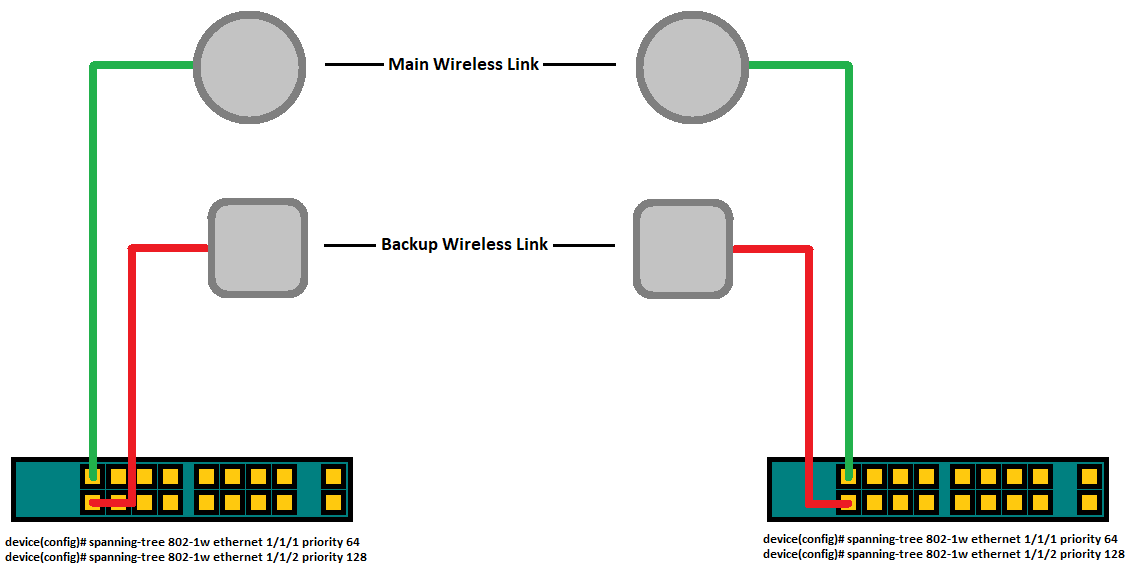
device(config)# spanning-tree 802-1w ethernet 1/1/x priority 64
By default all ports have a priority of 128* so if you give a priority of 64 that port will be preferred to be Forwarding on RSTP.
With this setup both primary ports will be functioning in a forwarding state. Dynamically, one of the backup ports will also be running in a forwarding state while the opposite end will be running in a discarding state to prevent a loop. Should the main wireless link disconnect or one of the heads power down, both backup ports will resume a forwarding state.

Ports roles can have one of the following states:
- Forwarding - 802.1W is allowing the port to send and receive all packets.
- Discarding - 802.1W has blocked data traffic on this port to prevent a loop. The device or VLAN can reach the root bridge using another port, whose state is forwarding. When a port is in this state, the port does not transmit or receive data frames, but the port does continue to receive RST BPDUs. This state corresponds to the listening and blocking states of 802.1D.
- Learning - 802.1W is allowing MAC entries to be added to the filtering database but does not permit forwarding of data frames. The device can learn the MAC addresses of frames that the port receives during this state and make corresponding entries in the MAC table.
- Disabled - The port is not participating in 802.1W. This can occur when the port is disconnected or 802.1W is administratively disabled on the port.
Link reference: (http://docs.ruckuswireless.com/fastiron/08.0.80/fastiron-08080-l2guide/GUID-65F3A36C-6A87-4752-9CBD-5C7E7CB505F9.html)
No Comments