
Clouding an ICX Switch
Introduction
SmartZone management and monitoring of ICX switches. The initial release (v.08.0.80) is the first step toward a full-featured wired/wireless integration plan and focuses on monitoring, status, usage visibility, and some basic management, including configuration backups and firmware management.
Method
To direct an ICX switch to the cloud there are a few parameters that must be met;
- SZ Firmware (must be v.5 minimum)
- ICX Firmware (must be v.08.0.80 minimum)
Once the following has been met, check the connection to the cloud controller by pinging the necessary IP, for example;
|
SSH@ICX7150-24P Switch>ping xxx.xxx.xxx.xxx Sending 1, 16-byte ICMP Echo to xxx.xxx.xxx.xxx, timeout 5000 msec, TTL 64 Type Control-c to abort Reply from xxx.xxx.xxx.xxx : bytes=16 time=13ms TTL=53 Success rate is 100 percent (1/1), round-trip min/avg/max=13/13/13 ms. SSH@ICX7150-24P Switch> |
Should you not be able to ping the controller you must check the following; L2/L3 network, firewall(s), etc.
Point the Switch toward the cloud with the following command(s) your IP may vary depending on the vSZ you are directing your switch to;
|
SSH@ICX7150-24P Switch>en No password has been assigned yet... SSH@ICX7150-24P Switch#conf t SSH@ICX7150-24P Switch(config)#sz active-list xxx.xxx.xxx.xxx Version 08.0.92 onwards use the command below. SSH@ICX7150-24P Switch(config)# |
Log in to the SZ and go to: Switches > Default Group (Staging Zone), highlight the device, and move to the required switch group. The switch will appear in the group as offline until approved. check the MAC address to ensure you have the correct switch.
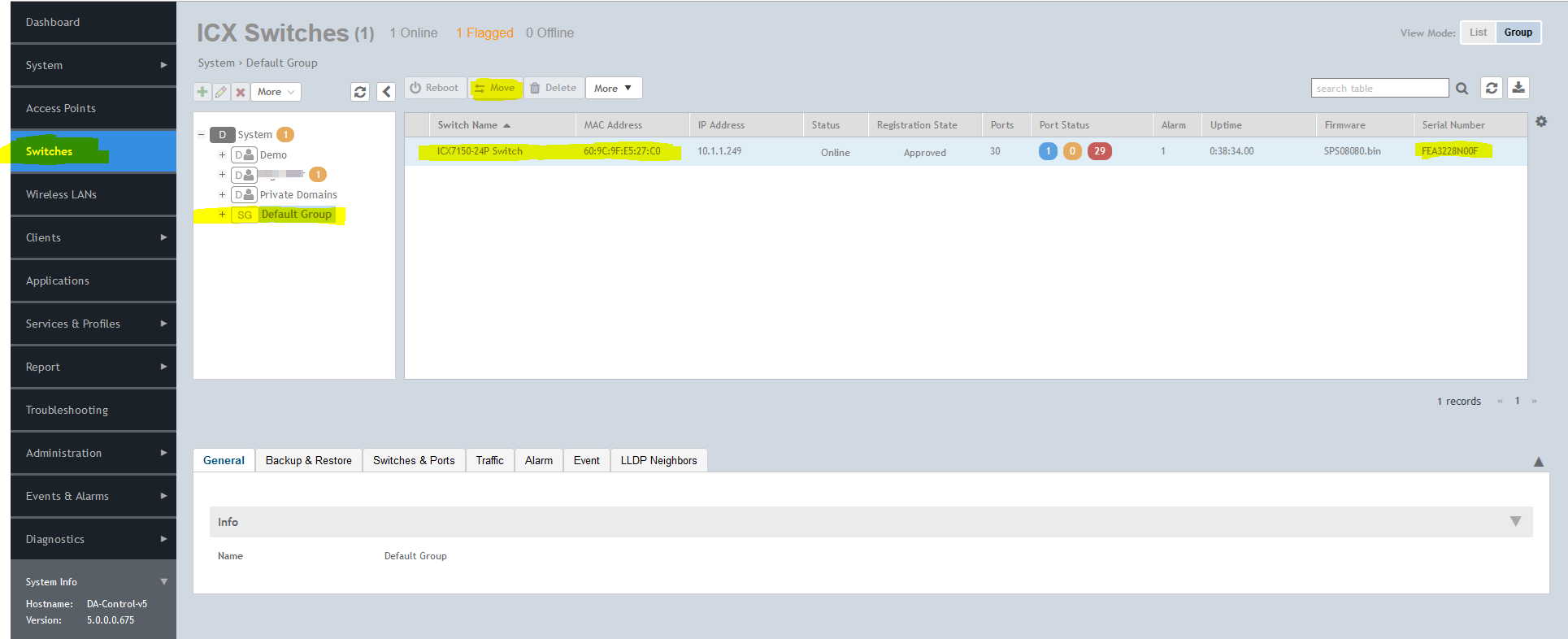
Highlight the correct switch and then click move to relocate the switch to the correct zone as required.
No Comments