
The Channels You Don't Own
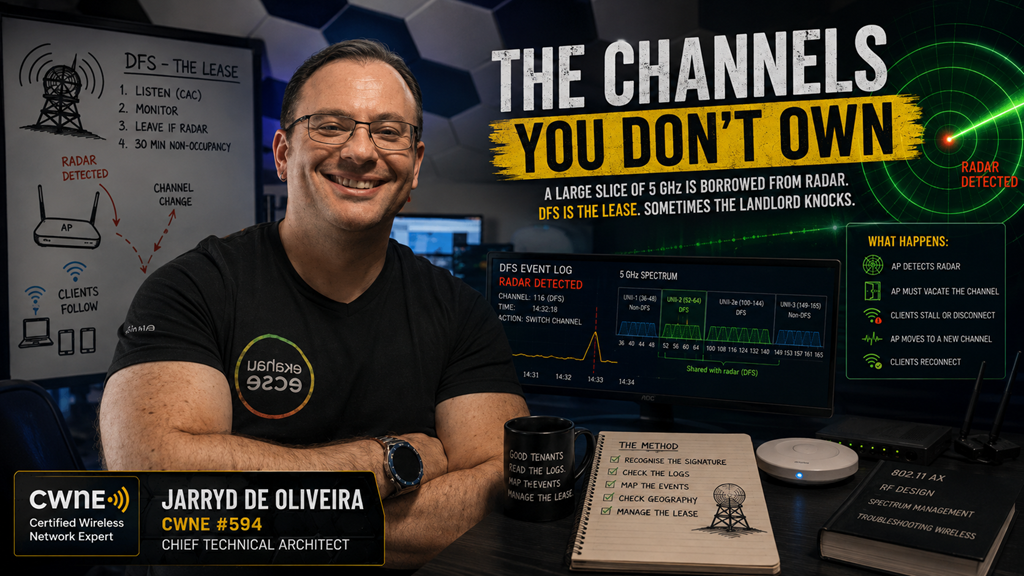
A large slice of 5 GHz is borrowed from radar. DFS is the lease. Sometimes the landlord knocks.
This ticket has a signature, and once you know it, you will rarely mistake it for anything else.
Every client in one area stalls or drops at the same moment.
Not one flaky laptop. All of them. Together.
Moments later, or perhaps a minute later, most of them are back and everything looks normal.
The logs show the access point changed channel. Nobody touched anything. There was no configuration change, no planned maintenance, no reboot and no ordinary RRM decision.
The ticket says, “The Wi-Fi glitched.”
What actually happened is simpler and stranger:
Your access point heard radar, and the law told it to leave.
You are a tenant on that spectrum
Here is the part of 5 GHz that rarely gets explained properly.
A large portion of the 5 GHz band is shared spectrum. The primary users are radar systems, including weather, maritime, aviation and military radar.
Your WLAN is the secondary user.
DFS, Dynamic Frequency Selection, is the mechanism that makes that sharing legal. It is not an optional vendor feature. It is the condition of the lease.
The lease terms are roughly this:
Before an AP can transmit on a DFS channel, it must listen first. That is the Channel Availability Check, normally around 60 seconds.
In the ETSI regulatory domain used across Europe, channels overlapping the 5600–5650 MHz weather-radar range can require a much longer check, commonly ten minutes.
While operating, the AP keeps listening. That is in-service monitoring.
If radar is detected, the AP must stop using the affected channel and move, normally announcing the change to its clients on the way out.
The vacated channel then enters a non-occupancy period, typically around thirty minutes, before it can even be considered again.
Radar detected, everybody out.
That is the whole deal.
What it looks like from the floor
The ticket signature follows directly from the mechanism.
A simultaneous stall or disconnect affecting every client on one AP’s 5 GHz radio, because the whole cell moved together.
Some clients follow the channel switch announcement cleanly and experience only a pause. Others disconnect and rejoin. The visible result depends on the AP, the client and where the AP moves next.
Recovery may be almost immediate if the AP selects a non-DFS channel or has already cleared another channel in the background.
It may take longer if the destination channel also requires an availability check.
And there is often a knock-on performance complaint afterwards.
The AP may flee to whatever channel is available, which is frequently a crowded non-DFS channel already occupied by its neighbours.
The radar event lasts a moment. The resulting co-channel contention may last far longer.
There is a second, sneakier signature worth knowing:
The AP that takes a minute to appear.
Reboot an AP that lives on a DFS channel and its 5 GHz radio may not come up at the same time as the rest of the AP.
It sits silent through the availability check, listening for radar, before it is allowed to transmit.
On parts of the European weather-radar range, that wait may be closer to ten minutes than one.
If you have ever rebooted an AP, watched it come online and then spent a confused minute wondering where the 5 GHz network went, that was not necessarily a fault.
That was the lease.
Not every detection is radar
Now the honest complication.
Radar detection is pattern matching against pulse signatures, and pattern matching can produce false positives.
Some radios, some firmware versions and some noisy environments produce radar detections when there is no radar present.
Certain interference can resemble a pulse pattern closely enough to trigger an event.
So read the pattern, not the single event.
Occasional events across several APs, particularly at a site near plausible radar activity, may be genuine.
Airports, ports, coastlines, weather radar installations and military activity are useful clues, although proximity alone does not prove the source.
One AP logging events constantly while its neighbours on the same channels hear nothing deserves suspicion.
Look at that AP’s environment. Compare its event history with nearby APs. Check whether the behaviour began after a firmware change.
Detection behaviour genuinely changes between hardware and software releases.
The event log is evidence either way.
DFS events are normally logged, timestamped and tied to a channel.
This is one of the easiest tickets in wireless to prove, and one of the most commonly guessed at instead.
So why use DFS channels at all?
Because without them, 5 GHz is small.
Strip out the DFS ranges and you are left with a limited number of non-DFS channels.
In a dense deployment, or anywhere you want wider channels, that is nowhere near enough spectrum to build a clean reuse plan.
Every AP ends up sharing airtime with its neighbours, and you trade occasional radar events for permanent co-channel contention.
That is usually a bad trade.
DFS is not the enemy.
Unmanaged DFS is.
The design questions are the same ones as always, just with a landlord involved.
How close is the site to plausible radar sources?
Airports, ports, coastlines, weather radar installations and military sites may help explain the event pattern, but the logs still need to support the theory.
Which DFS channels have a clean history here?
The AP logs will tell you, per channel and per AP, over days or weeks.
Let the site’s own evidence prune the channel plan.
Do wider channels make sense?
A wide channel touching a troubled frequency range inherits its radar events. Sometimes the right answer is narrower channels on quieter spectrum.
And what is the client population?
Client discovery behaviour on DFS channels varies by chipset, driver and regulatory domain.
Some clients search those channels less aggressively, take longer to rediscover an AP after a move, or behave poorly during channel changes.
For most estates this is a footnote.
For some specialist devices, it matters.
Modern platforms may reduce the disruption using background scanning, dedicated sensor radios, zero-wait DFS or bandwidth reduction.
These features can shorten the interruption, but they do not remove the regulatory requirement.
When radar is detected, the affected spectrum still has to be vacated.
A war story from the aisles
The version of this ticket I will always remember was a warehouse full of autonomous robots, a few miles from an airport.
The robots would pause.
Not everywhere, and not on a schedule.
Specific aisles. Random times. Several robots at once. Then recovery.
Everyone was staring at the robots’ software because the pattern felt like a system fault.
The AP logs told a different story.
Radar events, over and over, on the same cluster of channels, on the APs covering exactly those aisles.
Every pause lined up with a channel evacuation.
The robots were not crashing.
Their cell was being evicted, and a fleet that expects continuous connectivity noticed the gap that a person carrying a laptop might never see.
The fix was not turning DFS off.
It was pruning the channel plan away from the ranges with the worst event history, keeping the cleaner DFS channels and re-checking the logs monthly.
The robots stopped pausing.
The spectrum was the same.
The lease was just being managed instead of ignored.
The method
Recognise the signature first.
Simultaneous per-cell stalls or drops, a logged channel change and self-recovery.
That combination should put DFS near the top of the list.
Pull the AP event log and confirm the radar detection, the channel and the time.
This ticket comes with receipts.
Map the events.
Which APs are affected? Which channels? How often?
One AP constantly detecting alone points towards that AP, its immediate environment or its software.
Many APs detecting on the same frequency range at similar times points more strongly towards genuine radar activity.
Check the geography, but do not use it as proof.
Airports, coasts, ports and weather radar sites can make events more likely, but the event history still has to support the conclusion.
Then manage the lease.
Prune persistently noisy channels from the plan.
Keep the clean DFS channels.
Consider narrower channel widths where wider channels repeatedly overlap troubled spectrum.
Understand whether the platform supports background scanning or zero-wait DFS.
Mind the availability check when scheduling reboots.
And review the logs periodically, because the RF neighbourhood changes.
Final Thoughts
A big slice of your 5 GHz network runs on borrowed spectrum, and the borrowing comes with rules.
Listen before transmitting.
Keep listening.
Leave when told.
Do not come back for half an hour.
Many of the most mysterious “the Wi-Fi glitched and then recovered” tickets on DFS channels are the lease working exactly as written.
You cannot negotiate with radar.
But you can read your own logs, learn which channels are quiet at your site and design as a good tenant.
The channels were never yours.
Manage them like you know it.
This is part of an ongoing wireless troubleshooting series. The method remains the same: scope the problem first, then investigate the layer the symptom actually points towards.