
Ruckus Access Point LED Status
Introduction
This section describes the physical LED status and descriptions of the Ruckus Access Points.
LED Behaviour
If you believe an AP is not operating normally, checking the onboard LEDs can help you determine the AP behavior.
If wireless devices that are connected to your APs are experiencing connectivity issues, check the AP LEDs to determine if your APs are operating normally.
Note: In the following diagram, some newer APs display CTL instead of DIR for the LED, second LED from the left.
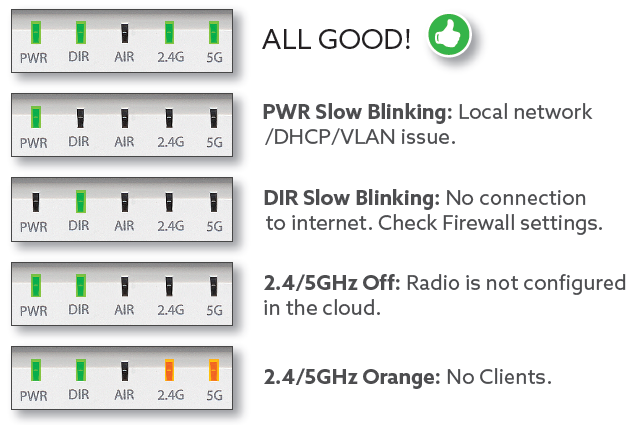
The following table describes the LEDs on the AP, how they behave, and what they mean.
| LED | Color | Description |
|---|---|---|
| PWR | 
|
|

| DHCP, ||

| ||

Solid |
||

| is ||

| Check ||

|
||

|
||
| Off | ||
| AIR | 
|
Not |

| ||

| ||

| ||

| ||

| ||

|