
Bonding Examples
Bonding EoIP tunnels over two wireless links
This is an example of aggregating multiple network interfaces into a single pipe. In particular, it is shown how to aggregate multiple virtual (EoIP) interfaces to get maximum throughput (MT) with emphasis on availability.
Network Diagram
Two routers R1 and R2 are interconnected via wireless links. Wireless interfaces on both sides have assigned IP addresses.
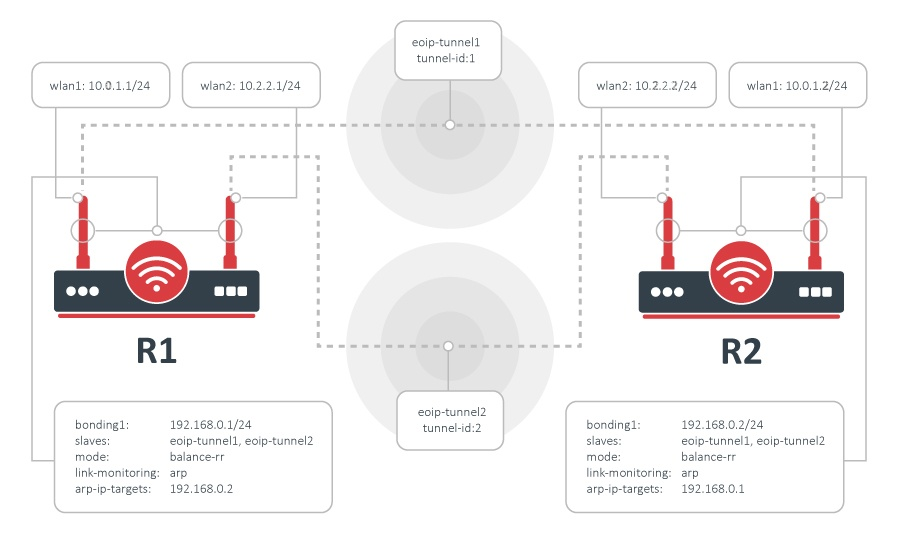
Configuration
Bonding could be used only on OSI layer 2 (Ethernet level) connections. Thus we need to create EoIP interfaces on each of the wireless links. This is done as follows:
on router R1:
/interface eoip add remote-address=10.0.1.1/24 tunnel-id=1
/interface eoip add remote-address=10.2.2.1/24 tunnel-id=2
and on router R2:
/interface eoip add remote-address=10.0.1.2/24 tunnel-id=1
/interface eoip add remote-address=10.2.2.2/24 tunnel-id=2
The second step is to add a bonding interface and specify EoIP interfaces as slaves:
R1:
/interface bonding add slaves=eoip-tunnel1,eoip-tunnel2 mode=balance-rrR2:
/interface bonding add slaves=eoip-tunnel1,eoip-tunnel2 mode=balance-rrThe last step is to add IP addresses to the bonding interfaces:
R1:
/ip address add address 192.168.0.1/24 interface=bonding1R2:
/ip address add address 192.168.0.2/24 interface=bonding1Test the configuration
Now two routers are able to reach each other using addresses from the 192.168.0.0/24 network. To verify bonding interface functionality, do the following:
R1:
/interface monitor-traffic eoip-tunnel1,eoip-tunnel2R2:
/tool bandwidth-test 192.168.0.1 direction=transmitYou should see that traffic is distributed equally across both EoIP interfaces:
/int monitor-traffic eoip-tunnel1,eoip-tunnel2
    received-packets-per-second: 685      685
       received-bits-per-second: 8.0Mbps  8.0Mbps
        sent-packets-per-second: 21       20
           sent-bits-per-second: 11.9kbps 11.0kbps
    received-packets-per-second: 898      899
       received-bits-per-second: 10.6Mbps 10.6Mbps
        sent-packets-per-second: 20       21
           sent-bits-per-second: 11.0kbps 11.9kbps
    received-packets-per-second: 975      975
       received-bits-per-second: 11.5Mbps 11.5Mbps
        sent-packets-per-second: 22       22
           sent-bits-per-second: 12.4kbps 12.3kbps
    received-packets-per-second: 980      980
       received-bits-per-second: 11.6Mbps 11.6Mbps
        sent-packets-per-second: 21       21
           sent-bits-per-second: 11.9kbps 11.8kbps
    received-packets-per-second: 977      977
       received-bits-per-second: 11.6Mbps 11.5Mbps
        sent-packets-per-second: 21       21
           sent-bits-per-second: 11.9kbps 11.8kbps
-- [Q quit|D dump|C-z pause]
Link Monitoring
It is easy to notice that with the configuration above as soon as any individual link fails, the bonding interface throughput collapses. That's because no link monitoring is performed, consequently, the bonding driver is unaware of problems with the underlying links. Enabling link monitoring is a must in most bonding configurations. To enable ARP link monitoring, do the following:
R1:
/interface bonding set bonding1 link-monitoring=arp arp-ip-targets=192.168.0.2R2:
/interface bonding set bonding1 link-monitoring=arp arp-ip-targets=192.168.0.1