You Can't Force a Client to Roam
https://www.linkedin.com/pulse/you-cant-force-client-roam-jarryd-de-oliveira-w0b2e
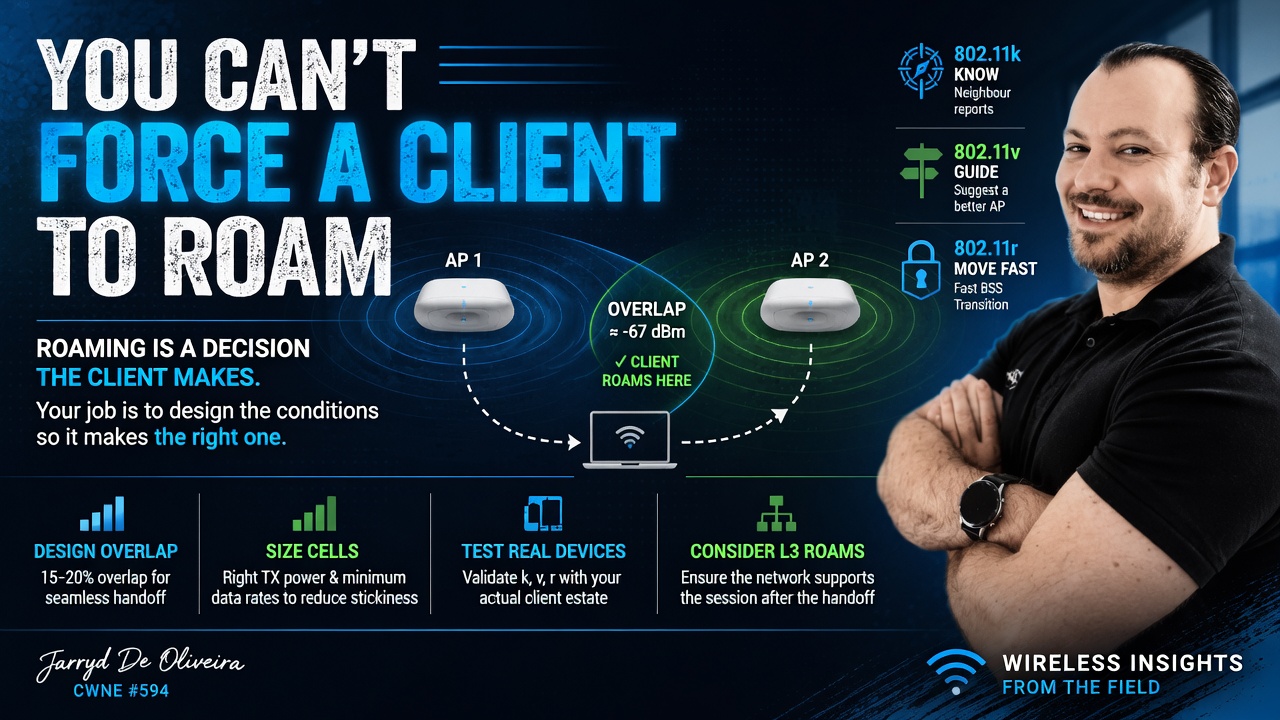
Roaming is a decision the client makes. Your job is to design the conditions so it makes the right decision.
Two tickets land on your desk.
The first is a user whose call drops as they walk from one end of the building to the other.
The second is a user sat directly under a brand-new access point, while their laptop is still clinging to one halfway across the building at a terrible data rate.
Opposite symptoms.
Same root problem.
In both cases, the client is deciding when to roam, and it is making a poor decision.
That is the part people often miss with Wi-Fi. You cannot reach into a laptop, phone, scanner, or handheld terminal and force it to roam at the exact moment you want. Roaming is client-driven.
What you can do is design the RF environment so the correct decision becomes the obvious one.
That shift in thinking is important.
Stop trying to control the roam.
Start controlling the conditions around it.
No overlap, no roam
Before any of the clever roaming features matter, the physical design has to give the client somewhere better to go.
A client cannot roam cleanly if the next access point is not already viable before the current connection becomes poor. This is especially important for real-time traffic like voice and video, where the session does not have much tolerance for delay, retries, or packet loss.
For voice-capable WLANs, you would typically design for around 15 to 20 percent cell overlap. The goal is to make sure there is always a suitable neighbouring AP available before the current cell fades too far.
A common design target is for the neighbouring AP to be available at around -67 dBm at the edge of the serving cell. That gives the client a sensible roaming candidate while the current connection is still healthy enough to maintain the session.
Get this wrong and the rest of the tuning will only get you so far.
If there is no good AP for the client to move to, no amount of 802.11k, 802.11v, 802.11r, transmit power tuning, or data rate adjustment will magically produce a clean roam.
The client needs somewhere better to go.
The k, v and r trio, and the catch
There are three roaming amendments that are commonly discussed when trying to improve roaming behaviour.
802.11k helps the client by providing neighbour reports. Instead of the client having to scan every possible channel, it can be told which neighbouring APs are worth checking.
802.11v allows the infrastructure to suggest a better AP using BSS Transition Management. That word matters: suggest. The client can still ignore the suggestion.
802.11r enables Fast BSS Transition, allowing the client to roam without going through the full authentication process again. This can make a big difference for voice, video, and other time-sensitive applications.
In the right environment, enabling k, v and r can make roaming faster and cleaner.
But here is the catch.
You still need to test it against your real client estate.
Some older devices, budget chipsets, handheld terminals, scanners, printers, IoT devices, and poorly maintained drivers do not always behave well with these features. 802.11r in particular can cause issues with certain clients, including failed associations, dropped connections, or devices refusing to join the SSID entirely.
This is why you do not just enable everything because the controller has a checkbox for it.
Test it.
Test it with the devices that actually matter to the business.
A reference laptop is useful, but it does not tell you how the warehouse scanner, payment terminal, medical device, voice handset, or three-year-old Android tablet is going to behave.
Also check whether the roam crosses a subnet.
A Layer 2 roam within the same VLAN is one thing. A Layer 3 roam is another. If the client roams to an AP that places it into a different subnet without proper mobility support, the wireless handoff may look successful, but the session can still break because the client is left holding an IP address that no longer routes correctly.
The RF roam and the network path both need to work.
Sticky clients are the same problem in reverse
The other side of roaming is the sticky client.
This is the device that refuses to let go.
It might be sat under a perfectly good AP, but it is still connected to one at the other end of the building. The signal is poor, the data rate is low, retries are high, and the user experience is terrible.
It is easy to blame the client, and sometimes the client really is part of the problem.
But a lot of sticky client behaviour is caused by cell sizing.
If the distant AP is transmitting too loudly, the client can still hear it well enough to justify staying connected. From the client’s point of view, the current AP has not become bad enough yet.
That is why access point transmit power matters.
Use RRM carefully, or set power manually where the environment requires it. The goal is not to make every AP shout as loudly as possible. The goal is to size the cells properly and keep AP power broadly aligned with what a typical client can transmit back.
Wi-Fi is a two-way conversation.
It does not help if the AP can shout across the building, but the client cannot talk back properly.
One of the most effective tools for influencing roaming behaviour is the minimum basic data rate.
Removing legacy rates such as 1, 2, 5.5 and 11 Mbps, then setting 12 Mbps or 24 Mbps as the minimum where appropriate, reduces the effective size of each cell. A client at the edge of coverage can no longer sit comfortably on very low data rates, which makes a closer AP a more attractive option.
But be clear about what this is.
It is a cell-sizing tool.
It is not an instant kick.
The client still chooses when to roam.
Before making aggressive data rate changes, audit the client estate. Some older scanners, sensors, printers, and legacy devices may still rely on lower rates to associate or operate correctly, especially in older 2.4 GHz environments.
On modern enterprise WLANs, particularly where the focus is 5 GHz and 6 GHz, removing legacy rates is usually the right direction. But like everything in Wi-Fi, validate it against the real environment and the real devices.
RSSI is not the whole story
Another common mistake is treating roaming as if it is based only on signal strength.
RSSI matters, but it is not the only factor.
Different client devices use different roaming algorithms. Some look at SNR, retries, packet loss, current data rate, band preference, application behaviour, driver logic, power-saving state, and vendor-specific thresholds.
This is why two devices in the same location can behave differently.
One may roam early and cleanly.
Another may hang on until the connection is nearly unusable.
That does not mean the WLAN is automatically broken, but it does mean you need to design with client behaviour in mind rather than assuming every device will make the same decision at the same time.
Final thoughts
Roaming problems and sticky clients are two sides of the same reality.
You are not directly in control of the roaming decision.
The client is.
Your job is to control the conditions around that decision.
Build proper cell overlap so a good neighbouring AP is available before the current connection falls apart.
Enable 802.11k, 802.11v and 802.11r where they make sense, but prove them against your actual client estate before trusting them in production.
Use transmit power and minimum data rates to size cells properly, rather than allowing APs to shout across the building and create sticky client behaviour.
And always remember that a roam is not just an RF event. The network behind it still needs to support the session after the handoff.
Do that well, and most roaming tickets stop being mysterious roaming problems.
They become design questions.
Which is where they belonged all along.
This is part of an ongoing wireless troubleshooting series, building on the opening piece on triage: scope the problem first, then work the layer the symptom actually points at.
Jarryd De Oliveira, CWNE #594.