The Escalation That Went Nowhere
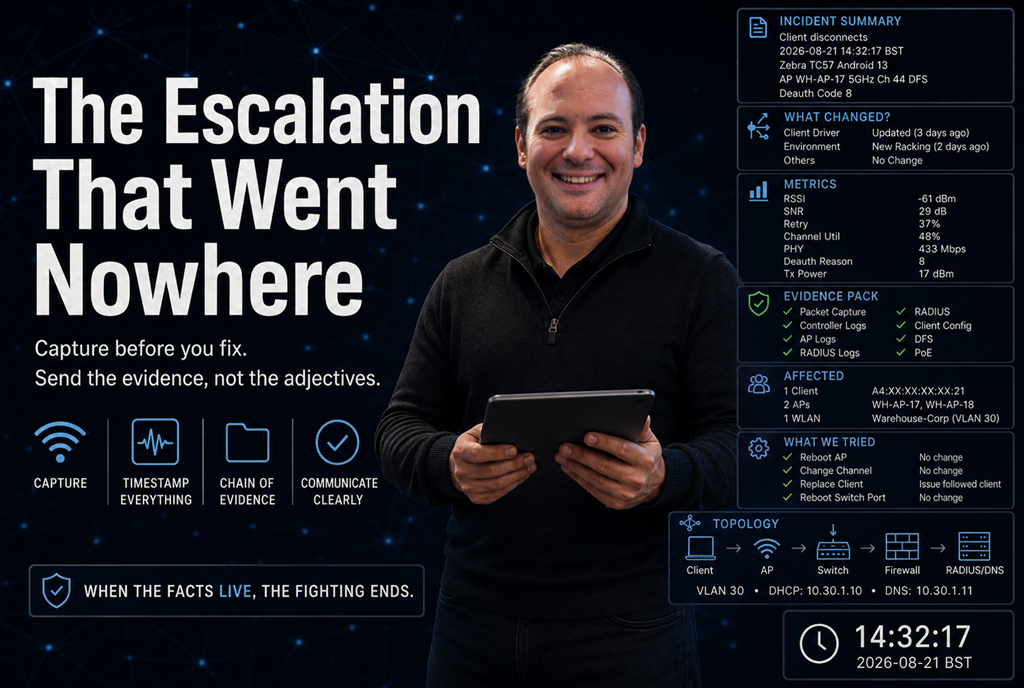
Support cannot troubleshoot what you have not captured. The case you build in the first hour often decides how long the ticket lives.
You have done the work.
You scoped it. You worked the layers. You are confident it is not a design problem, not a client configuration problem, and not something you can fix from the controller.
So you escalate.
And then nothing happens.
The case comes back asking for information you do not have. You go and collect it, and by the time you do, the logs have rotated and the user cannot remember exactly when it happened.
Another round trip.
Another week.
Six weeks later, the ticket is still open, everybody is frustrated, and nobody is any closer to understanding what actually happened.
Here is the uncomfortable truth about escalations.
Sometimes the vendor is slow.
But very often, the case was never properly made.
Support engineers cannot see your network. They were not standing next to the client when it failed. They cannot see the dashboards you were looking at, the RF environment around the AP, or the changes somebody made three days earlier.
They have exactly what you send them.
The quality of the case you hand over determines how quickly they can begin doing useful engineering instead of asking you for basic information.
And the case is built at the moment the fault happens, not at the moment you decide to escalate.
The four questions every case has to answer
Strip away the support templates, portal forms and mandatory dropdown boxes, and a good escalation answers four questions.
What exactly happened?
Not:
"The Wi-Fi is slow."
Not:
"Users keep dropping."
Not:
"The AP is behaving strangely."
Describe a specific, observable failure.
A client disassociated.
A radio stopped transmitting.
Authentication failed after the client sent its credentials.
Throughput fell from an expected value to a measured one.
The client received an IP address but could not reach its default gateway.
Support needs a fault that can be investigated, not an adjective.
When exactly did it happen?
To the second if possible, with the time zone stated.
This is one of the most common gaps in escalations, and one of the easiest ways to lose days.
A useful timestamp looks something like:
2026-08-21 14:32:17 BST (UTC+1)
Now somebody can search a controller log, RADIUS log, switch log, firewall session table or packet capture for the same event.
"About half three yesterday" is not a timestamp.
Who exactly was affected?
Which client?
MAC address, device model, operating system version, wireless driver or firmware version where available.
Which AP?
AP name, radio, BSSID or MAC address, channel and band.
Which WLAN?
SSID, VLAN, security method and authentication path where relevant.
If twenty clients were affected, say that.
If one client was affected while another device beside it worked perfectly, say that too.
That distinction matters.
What changed?
Firmware.
Configuration.
Client fleet.
Drivers.
Switching.
Authentication infrastructure.
Cabling.
AP placement.
The physical environment.
Neighbouring networks.
Another project happening somewhere else in the building.
"Nothing changed" is rarely as simple as it sounds.
Maybe nobody changed the WLAN configuration, but Windows Update installed a new wireless driver.
Maybe the AP firmware stayed the same, but a switch was replaced.
Maybe nobody touched the network, but new racking was installed and filled with stock.
Maybe somebody commissioned another wireless system next door.
Change does not always mean somebody logged into the controller.
Answer those four questions properly and you have already removed a large percentage of the normal support round trips.
Timestamps are the whole game
If I could give one habit to every engineer raising a support case, it would be this.
Get the time right.
The controller has one clock.
The switch has another.
The RADIUS server has a third.
The firewall has a fourth.
The client has a fifth.
And the user's description of "about half three" is effectively a sixth.
If those clocks are not aligned, nobody can correlate anything.
The investigation becomes guesswork.
Make sure NTP is actually working across the infrastructure, not merely configured.
There is an important difference.
State the time zone explicitly on every timestamp you provide.
Support teams work across countries and regions. Daylight-saving changes make things even more interesting.
A ticket that says:
14:32
is incomplete.
A ticket that says:
14:32:17 BST (UTC+1)
is something an engineer can work with.
And record the failure time from the most reliable source available, not from somebody's memory several hours later.
A packet capture with an accurate timestamp and a controller log with an accurate timestamp can be overlaid almost frame by frame.
Two captures with drifting clocks are just two files.
Capture before you fix
This is the part that hurts, because the natural instinct is exactly wrong.
When something breaks, engineers want to make it work again.
Reboot the AP.
Bounce the switch port.
Reconnect the client.
Restart the service.
Change a setting and see what happens.
Every one of those actions can destroy evidence.
A reboot can clear the state that would have explained the fault.
A configuration change breaks the trail because nobody can tell which of your five adjustments actually affected the behaviour.
Logs rotate.
Buffers overwrite.
Client state disappears.
Association tables change.
The event you needed is gone by the time anybody looks.
So when a fault is live, capture first.
Get the relevant logs off the system while the state still exists.
Take the packet capture while the failure is happening.
Record the client details.
Record the AP.
Record the channel.
Record what you observed and the exact time you observed it.
Then restore service.
There is an important caveat here.
Capture intelligently.
Do not blindly enable every possible debug category on a live production controller because an article told you to collect more logs.
Target the logging at the client, AP, protocol or subsystem you are investigating wherever the platform allows it.
Debugging can itself create load, generate enormous amounts of data and occasionally make an already difficult incident worse.
Collect enough evidence to understand the problem without creating another one.
And sometimes service restoration has to come first.
If the warehouse is stopped, the hospital system is unavailable or hundreds of users are offline, you may not have twenty minutes to build the perfect evidence pack.
That is fine.
Restore service.
But say what happened.
An honest note such as:
Service impact required us to restart the AP before a packet capture could be taken. Controller logs covering the incident window were preserved.
is far more useful than a vague description pretending evidence exists when it does not.
Every episode of this series produced an artefact
That is the point of working the layers properly.
Each type of troubleshooting leaves something behind that is worth capturing.
Scope and pattern
Who was affected?
Where?
When?
How many clients?
How often?
One device or fifty?
One AP or an entire floor?
Every morning at 08:15 or genuinely unpredictable?
Client state
Capture what the client actually received.
IP address.
Subnet mask.
Default gateway.
DNS servers.
DHCP information.
Do not assume the configuration is correct because the controller says the client is connected.
Look at the client.
Disconnect evidence
For deauthentication or disassociation events, capture the reason code and the transmitting address.
That can be extraordinarily valuable.
A disconnect described as:
"Wi-Fi dropped"
could have dozens of causes.
A deauthentication frame with a reason code, transmitter address and timestamp is evidence.
Performance evidence
Capture numbers.
Retry or retransmission percentage.
Channel utilisation.
SNR.
RSSI where appropriate.
PHY rate.
MCS information where the tooling exposes it.
Actual throughput.
Expected throughput.
"Signal looked good" tells support almost nothing.
-59 dBm, 31 dB SNR, 48% channel utilisation and 37% retries
tells them considerably more.
DFS events
Capture the radar or DFS event.
Channel.
AP.
Radio.
Exact timestamp.
Channel change.
What happened to associated clients afterwards.
DFS problems become much easier to investigate when the event can be lined up with what the client experienced.
Power
Capture the negotiated PoE class.
Requested power.
Allocated power.
LLDP or CDP negotiation where relevant.
Switch port information.
An AP that is "up" does not necessarily mean it received enough power to operate with every radio and feature enabled.
Roaming
Capture what the WLAN is configured to offer.
802.11k.
802.11v.
802.11r where applicable.
But also capture what the client actually did.
Which AP did it leave?
Which AP did it join?
How long did the transition take?
Was there a reassociation, authentication exchange or complete reconnect?
And record the client driver or firmware version.
A surprising number of wireless problems live there.
Attach the artefacts that apply to the fault.
A case containing the timestamp, reason code, AP details and client driver version is a case somebody can investigate.
A case saying:
"Clients keep dropping."
is a case likely to receive a template response.
Give support enough topology
Support does not need your entire network architecture document.
But they do need enough context to understand the path.
Something as simple as this can be incredibly useful:
Client → AP → Access Switch → Firewall → RADIUS/DHCP/DNS
Add the relevant VLANs, addresses and authentication path.
If traffic tunnels through a controller, say so.
If it breaks out locally, say so.
If RADIUS is hosted in another data centre, say so.
If DHCP lives behind a firewall, say so.
If the client moves through three different network devices before reaching the service that is failing, support needs to know those devices exist.
A five-line topology diagram can prevent five emails.
Reproduce it once, deliberately
Intermittent faults are difficult to escalate because:
"It happens sometimes."
gives support almost nothing to work with.
So if you can safely reproduce the problem, make it happen deliberately.
Find the smallest reliable set of steps that causes the failure.
One client.
One AP.
One action.
One observable result.
Then reproduce it once, safely, with targeted logging enabled and a capture running.
Do not create another production outage simply to produce a prettier support case.
If reproduction is disruptive, use a test device, maintenance window or controlled environment.
A reproduction recipe changes the escalation completely.
It moves the conversation from:
"We believe something is wrong."
to:
"Here is how you can see it."
And that means the support engineer can start testing hypotheses and fixes instead of trying to prove the original problem exists.
If you cannot reproduce the fault, say that clearly.
Then provide the pattern instead.
For example:
Three to five occurrences per day, normally between 08:00 and 09:30, affecting clients associated with WH-AP-17 and WH-AP-18. No occurrences observed on neighbouring APs.
That is useful.
"Randomly" is not.
What a bad escalation looks like
Consider this:
Users are randomly disconnecting from Wi-Fi in the warehouse. Please investigate.
Technically, it describes a problem.
Operationally, it gives support almost nothing.
Which users?
Which devices?
Which AP?
What time?
Which radio?
What happened during the disconnect?
Did the AP disconnect the client?
Did the client leave?
Did authentication fail?
Was there DFS?
Was the client roaming?
Was the AP rebooting?
Was the switch port bouncing?
Support now has to ask you all of those questions.
That is the first round trip.
What a useful escalation looks like
Now compare it with this:
Client A4:XX:XX:XX:XX:21, Zebra TC57 running Android 13, disconnected from WH-AP-17 at 14:32:17 BST on 20 August 2026.
That ticket may still contain a difficult problem.
But now the support engineer can actually start engineering.
A war story about two cases
Same vendor.
Same product.
Same organisation.
Two escalations, a few months apart.
The first ran for six weeks.
The original ticket said clients were dropping in one area.
No timestamps.
No reason codes.
No meaningful client information beyond:
"laptops."
By the time support asked for logs, the retention window had passed.
Somebody had rebooted the controller during the first week, clearing useful state.
Three settings had been changed along the way.
Nobody could even say with confidence what configuration had been active when the original fault occurred.
Six weeks of emails, log requests, retesting and round trips followed.
The case eventually closed without a definitive root cause.
The second case was completely different.
Same team.
But this time the evidence pack was ready.
Timestamps to the second with the time zone stated.
Deauthentication reason code and transmitting address.
Client model.
Operating system build.
Driver version.
AP name.
AP MAC.
Channel.
Firmware.
A short packet capture collected while the fault was live.
A simple topology showing the traffic path.
And a short note listing what had already been tested and what each test actually changed.
The support engineer recognised the pattern quickly and pointed towards known client-driver behaviour.
The issue moved forward almost immediately.
Nothing about the second fault was necessarily easier than the first.
The difference was entirely in the handover.
The method
When the fault is live, capture before you change anything if operationally possible.
Get the clocks right.
Make sure NTP is genuinely synchronised.
State the time zone on every timestamp.
Answer the four questions:
What happened?
When did it happen?
Who was affected?
What changed?
Capture the artefact produced by the layer you investigated.
Reason codes.
Retry rates.
Channel utilisation.
Packet captures.
DFS events.
Authentication logs.
Client configuration.
PoE negotiation.
Roaming timelines.
Give support enough topology to understand the traffic path.
Include everything you have already tested.
Do not simply say:
"We tried rebooting it."
Say what you changed and what happened afterwards.
If changing channel width made no difference, say so.
If replacing the client fixed the problem, say so.
If the issue followed the client to another AP, say so.
Those are findings.
They stop another engineer repeating the same tests.
Provide a reproduction recipe when you have one.
If you cannot reproduce the problem, give the frequency, locations, devices and pattern instead.
Then send the case once, complete, rather than building it across six emails over three weeks.
Final Thoughts
Escalation is not an admission that you could not solve the problem.
It is a handover.
And handovers are a skill.
The engineer at the other end is not standing in your building.
They cannot see your spectrum analysis.
They cannot see the controller dashboard you were watching.
They have never met your client estate.
They do not know which switch was replaced last week or which firmware deployment happened on Tuesday night unless you tell them.
Everything they know about your problem is what you chose to write down.
Everything they can correlate depends on the timestamps you give them.
And everything they can prove depends on what you captured before the evidence disappeared.
So build the case while the fault is in front of you.
Get the time right.
Capture before you fix.
Send the evidence, not the adjectives.
The escalation that goes nowhere is almost never the one nobody understood.
It is the one nobody could see.
This is part of an ongoing wireless troubleshooting series. The method remains the same: scope the problem first, then investigate the layer the symptom actually points towards.
Jarryd De Oliveira, CWNE #594